 4IT580: Docs
5th Practical Class:
Persistent Backend!
Database Setup
The backend is now configured with a MySQL database that is automatically seeded with initial data. You don't need to manually configure database connections or run migrations - everything is set up for you!
- The database is automatically seeded with sample data when the server starts
- You can view the data using phpMyAdmin with the credentials from your team email
- The database contains and tables with sample data
Reading data
ORM vs SQL
ORM = Object-Relational Mapping, it is usually a library that allows us to interact with the database using objects and methods that are more familiar to us than raw SQL. There's a lot of ORMs, but we will be using Prisma ORM, which is one of the most popular and type-safe ORMs for TypeScript.
Get all authors with their books
Assuming a simplified version of the data from the previous practical class:
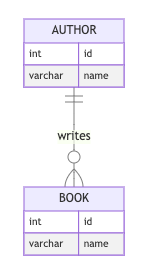
We want to get names of all authors and names of their books.
This will table output looking like this:
F. Scott Fitzgerald | The Great Gatsby |
Ernest Hemingway | The Old Man and the Sea |
Ernest Hemingway | For Whom the Bell Tolls |
F. Scott Fitzgerald | Tender Is the Night |
If we want to achieve the same result using Prisma ORM, we can do something like this:
Similarly, we do not have to create database tables and migrations (changes of tables) manually, we will use Prisma to generate both for us.
1. Create Author and Book tables using Prisma ORM
We will base this on the example data from the previous practical class.
Since we have a many-to-many relation here (meaning authors can have multiple books and books can have multiple authors), we use the directive to create a many-to-many relationship through a junction table that Prisma will manage automatically.
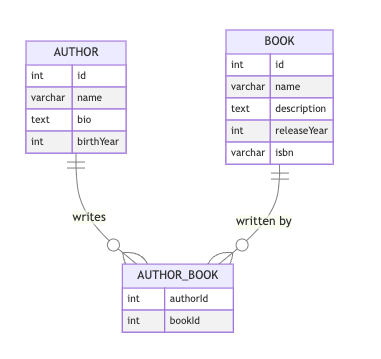
Now we will generate the Prisma client:
Or alternatively, you can use the npx command directly:
This will create the Prisma client based on your schema. You need to run this command whenever you make changes to your Prisma schema (like adding new models, changing field types, etc.) to update the TypeScript types and client methods.
The generated client provides type-safe database operations and is located in .
Note: The Book and Author models use IDs with instead of integer IDs. This provides globally unique identifiers that are better for distributed systems and prevent ID collisions.
Now we have the necessary tables in our database, but we are missing the data from the previous practical class.
For this purpose, we can update the function. First, let's create helper functions for creating books and authors:
Now update the main function:
You can however seed database also by calling command.
⚠️ Important Fix Required:
In both your Quacker project and project template, you need to update the file to include the flag:
Without the flag, you may encounter errors when the seed script tries to sync the database schema, especially when tables already exist. This flag ensures the database is completely reset before applying the schema.
If we check the data in phpMyAdmin or another database client, we will see that the data has been added to the database.
Replacing in-memory data with database
At this point, you should have completed the homework from the previous practical class, which means you have:
- Complete books and authors modules with working GraphQL API
- Relations between books and authors (books can have multiple authors, authors can have multiple books)
- All the homework data available in-memory
- Working queries and mutations for both books and authors
Now we'll replace the in-memory data storage with a real database using Prisma ORM.
Current state
Your current resolvers probably look something like this:
And your repositories are using in-memory arrays:
Now we'll replace this with Prisma database calls.
Updating repositories to use Prisma
Now we need to update our repositories to use Prisma instead of in-memory arrays. The service and resolver layers can stay mostly the same - we only need to change the data access layer.
Updating AuthorRepository
Updating BookRepository
Updating modules to include PrismaService
Don't forget to import the in your feature modules:
Updating Services and Resolvers to use Prisma
Since we have updated our repositories to use Prisma and we got rid of in-memory arrays the process is now asynchronous. This means we need to update our services and resolvers to use async/await.
Updating AuthorService
Updating AuthorsResolver
Updating BookService
Updating BookResolver
Testing the database integration
Now that we've updated our repositories, services and resolvers to use Prisma, let's test that everything works correctly.
Testing queries
You can test your updated GraphQL API in the Apollo Sandbox:
Testing mutations
Key differences from in-memory storage
When moving from in-memory arrays to a database:
- Async operations: All database calls are now asynchronous, so we use
- Data mapping: We need to map between Prisma's data structure and our domain models
- Relations: Prisma handles the many-to-many relationships automatically
- Persistence: Data is now stored permanently in the database
- Type safety: Prisma provides full TypeScript support for database operations
Input x Type
- describes shape of data that will be provided by API
- describes shape of data that API will receive
- Special object type that allows use objects in arguments of the mutation
Example Type
Resulting GraphQL schema: